
AISA Core Settings
The AISA Core Settings section is where you enable and configure the main behavior of your AI Sales Assistant.
AISA Fallback User
You can select an AISA Fallback User to determine which user AISA should send messages from when the assigned sales rep does not have a texting number.
When an Up Sheet's assigned rep does not have a texting number, AISA will send the message from the selected fallback user instead of selecting an arbitrary rep.
Important: The selected fallback user must have a texting number. If they do not, AISA will fall back to the first available rep, as before.
After-Hours Mode
After-Hours Mode allows AISA to give first contact to net-new leads outside of your active business hours.
During your active hours, your team will be responsible for making first contact with new leads. Outside of those hours, AISA can respond automatically so new leads are not left waiting.
To enable After-Hours Mode:
- Set your active business hours.
- Select the Invert option.
- This tells AISA to operate outside of the hours you have selected.
Example: If your active hours are 9:00 AM–5:00 PM and you select Invert, AISA will be enabled for first contact outside of those hours.
Important: After-Hours Mode applies to first contact with net-new leads. It does not change the timing of AISA follow-up messages.
Channels Enabled
Use Channels Enabled to choose which communication channels AISA can use when engaging with leads.
You can enable:
- Text only
- Email only
- Text and Email
Select the channels that best fit your dealership's communication preferences.
Follow-Up & Escalation
The Follow-Up & Escalation section controls when and how AISA follows up with leads and identifies conversations that may require human intervention.
Hours the CRM Assistant Will Send Follow-Up Messages
Set the days and hours when the CRM Assistant will send follow-up messages to leads.
These settings control only follow-up outreach and do not affect AISA's initial response to a new lead, which is sent immediately when a new lead comes in.
Use this section to:
- Define which days follow-ups are allowed
- Set acceptable time windows for outreach
- Ensure messaging aligns with business hours and customer expectations
Creating Follow-Up Sequences
Follow-up sequences help keep leads engaged until they are ready to move forward.
Setting Follow-Up Parameters
In the Follow-Up & Escalation section, configure the following:
- Unworked Lead Follow-Up
Enter the number of hours before the first follow-up attempt. For example, 1 means AISA will wait one hour before sending the first follow-up. - Follow-Up Window
Set the total number of days AISA will continue attempting to follow up with the lead. For example, 14 means AISA can continue follow-ups for up to 14 days. - Follow-Ups Per Day
Choose how many follow-up attempts AISA can make within a 24-hour period. We recommend 1–3 follow-ups per day. - Follow-Up Times
Set the specific time or times when follow-up messages can be sent. For example, 9:00 AM.
Understanding the Settings
- Unworked Lead Follow-Up
Determines how long AISA waits before following up with a new, unopened lead. - Follow-Up Window
Determines how long AISA will continue attempting to reconnect with the lead. - Follow-Ups Per Day
Determines the maximum number of follow-up attempts AISA can make within a 24-hour period. - Follow-Up Times
Determines the specific times of day when follow-up messages can be sent.
Please note: The timing configured on the Follow-Up & Escalation page does not determine when AISA responds to a new lead or an incoming customer message. These settings apply only to follow-up messages.
Follow-Up Timing Strategy
Optimal Send Times
Configure these times under Follow-Up Times:
- Morning (9–11 AM) – Best for initial follow-ups
- Lunch (12–1 PM) – Good for quick check-ins
- Evening (5–7 PM) – Ideal for working professionals
- Avoid sending follow-ups before 9 AM or after 8 PM
Escalation Keywords
Escalation Keywords help identify conversations where a customer may have a high level of buying intent or needs assistance from a member of your team.
When a customer uses one of your configured keywords or phrases, AISA will automatically:
- Move the Up Sheet to the AI Escalated tab under Up Sheets
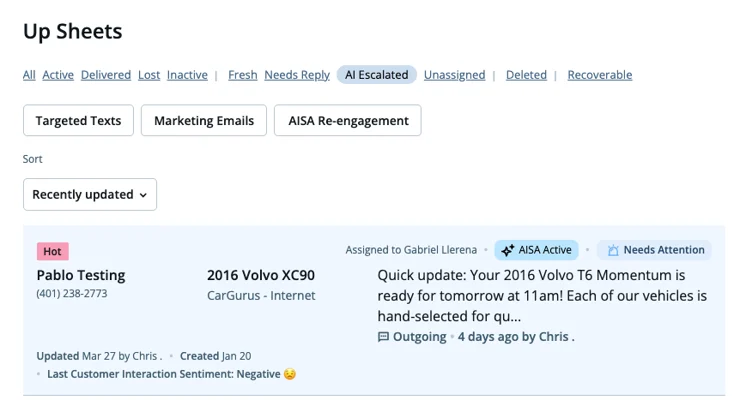
- Flag the conversation for team review
- Allow your team to step in and take over the conversation
This helps ensure that high-intent leads are not missed while AISA is managing the initial conversation.
How to Set Up Escalation Keywords
- Go to Admin Settings.
- Select AI Sales Assistant.
- Open CRM Assistant.
- Navigate to Follow-Up & Escalation.
- Add your desired keywords or phrases.
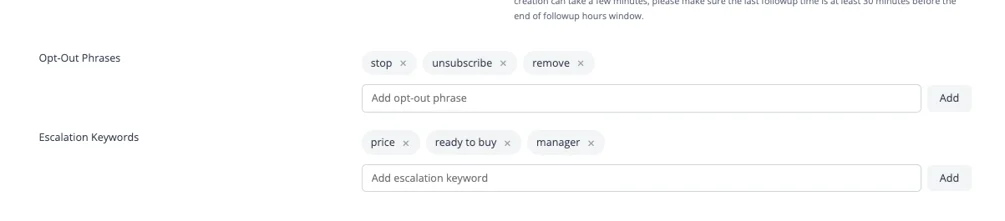
You can add terms that indicate urgency, buying intent, or a request for human assistance.
Example Keywords and Phrases
Consider adding phrases such as:
- "What's the price?"
- "Can I speak to a manager?"
- "I'm ready to buy"
- "Is this still available?"
- "I want to come in today"
- "Can someone call me?"
Why Use Escalation Keywords?
Escalation keywords help your team:
- Quickly identify high-intent leads
- Avoid missing important customer conversations
- Step in when human assistance is needed
- Respond faster when a customer is ready to move forward
Tip: Use natural phrases that your customers commonly use when they are ready to take the next step.
Per-Source Configuration
Per-Source Configuration allows you to control which lead sources AISA will automatically engage with when a new lead comes in.
This gives you more control over where AISA is enabled and allows you to apply different strategies to different lead channels.
You can use this section to:
- Enable or disable AISA auto-engagement for specific lead sources
- Choose which e-lead sources AISA should respond to
- Ensure AISA only engages with the lead sources where you want automated responses
Select the e-lead sources you want AISA to automatically engage with when new leads are received.
Tip: Review your source settings regularly to make sure AISA is enabled for the lead sources where you want immediate automated engagement.
Best Practices
-
Provide Value
Every follow-up should offer something useful to the lead -
Respect Boundaries
Honor timing, frequency, and communication preferences -
Track Everything
Monitor results to understand what’s working -
Know When to Stop
Some leads aren’t ready — and that’s okay