
Flexible automated text messages inside AutoRaptor now allows you to schedule automated messages using fully custom content—without needing to select a pre-built template.
Instead of being limited to existing templates for follow-ups, you can write your message exactly how you want it. Personalize it for each customer, adjust the tone to fit the conversation, and tailor the details to the situation—all while still automating delivery.
This added flexibility makes it easier to create communication that feels natural and relevant, while maintaining the efficiency and consistency of scheduled automation.
Below is a simple step-by-step guide to help you get started.
Step 1: Open the Messages Feature
Navigate to the Text Messages section inside AutoRaptor as you normally would when sending a text message.
Step 2: Write Your Custom Message
Instead of selecting a pre-built template, click directly into the text box and type your message.
This gives you complete flexibility to:
-
Personalize the message for the customer
-
Adjust the tone to match your communication style
-
Include specific details relevant to the conversation
-
Create messaging that feels natural and authentic
You’re in full control of the content while still benefiting from automation.
Step 3: Choose Your Delivery Timing
Next, select when you want the message to be sent.
You can:
-
Choose from the predetermined scheduling options
or -
Select a custom date and time that fits your follow-up strategy
This flexibility ensures your message is delivered at the right moment.
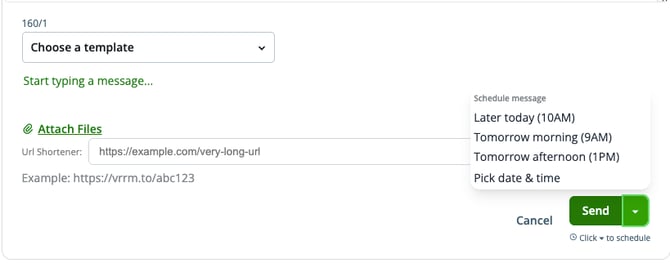
Step 4: Click Schedule
Once your message is written and your timing is selected, click Schedule.
Your flexible automated text message will now be automatically delivered at the time you selected—no template required.
This is what your flexible automated text message will look like:
-2.png?width=670&height=158&name=unnamed%20(1)-2.png)
You’re no longer limited to existing templates when scheduling follow-ups. You can create personalized, customer-focused messages while still automating the process.
It’s the perfect combination of flexibility and efficiency—helping you communicate more effectively while saving time.