
Overview
This feature adds three connected pieces to AutoRaptor:
- A Rep Efficiency report for managers, showing one row per rep with outgoing activity, appointments set, and efficiency ratios for any date range.
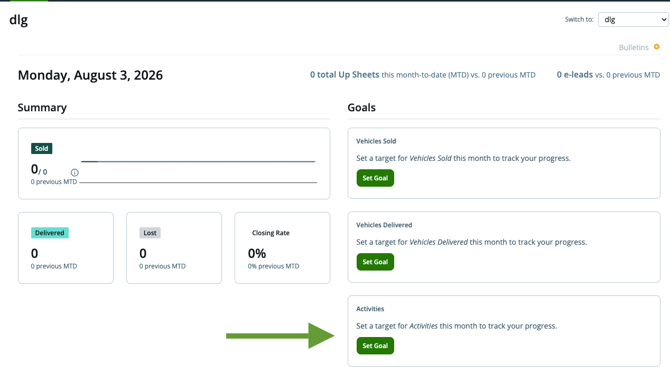
- Per-rep activity goals — a monthly target for calls + texts + emails, tracked automatically against what each rep actually does.
- A bulk goal-setting tool on the Users settings page so admins can set sold, delivered, and activity goals for the whole team from one screen.
Who sees what
- Managers/admins set activity goals (individually or in bulk) and use the Rep Efficiency report to compare reps.
- Reps see their own goal progress on their dashboard in real time — no separate report needed.
Setting activity goals
Set a goal for one rep
Set a monthly activity target (calls + texts + emails combined) for an individual sales rep from their user profile.
Set goals in bulk
ADMINS:
Go to Users → Set user goals. From this one screen, admins can set every rep's:
- Sold goal
- Delivered goal
- Activity goal
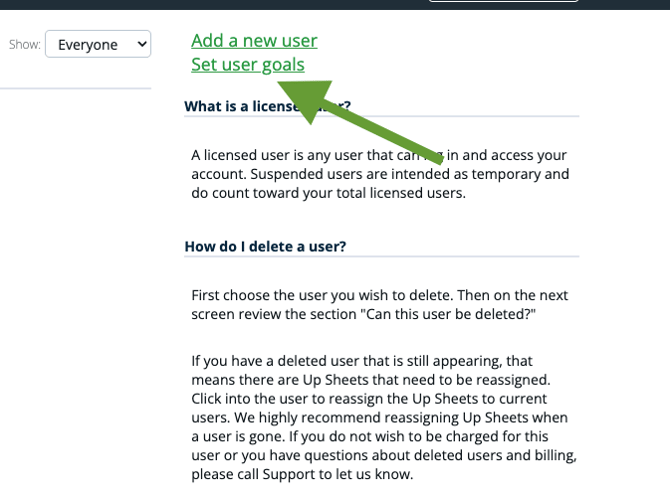
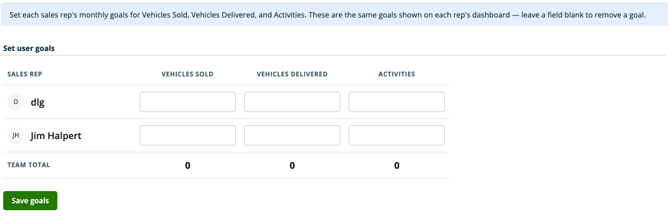
Changes made here sync both ways with each rep's dashboard — updating a goal in either place keeps both in sync.
How goal progress is tracked
Once a goal is set, AutoRaptor counts each rep's outgoing calls, texts, and emails automatically — no manual logging required. Progress updates in real time and shows:
- Achieved — activity completed so far in the period
- Remaining — what's left to hit the target
- Percentage — achieved as a percent of goal
- Pace — whether the rep is on pace, behind, or over goal given how much of the month has elapsed
This progress appears on the rep's own dashboard, and alongside the numbers in the Rep Efficiency report for managers.
The Rep Efficiency Report
Location: Sales Rep Dashboard
What it shows: One row per rep, for any date range you select. Each row includes:
|
Column |
Description |
|---|---|
|
Outgoing calls |
Total calls made in the date range |
|
Outgoing texts |
Total texts sent in the date range |
|
Outgoing emails |
Total emails sent in the date range |
|
Appointments set |
Appointments the rep set in the date range |
|
Calls per appointment |
Outgoing calls ÷ appointments set |
|
Activities per appointment |
Total activities (calls + texts + emails) ÷ appointments set |
Goal progress (achieved, percentage, and pace) appears alongside these numbers, so managers can see efficiency and goal attainment side by side.
Use it to: Compare how much outreach each rep needs to set an appointment, spot reps who are highly efficient (low activities-per-appointment) versus reps who may need coaching, and check goal pacing across the whole team at once.
How it works, step by step:
- Users → Set user goals.
- Reps make their calls, texts, and emails as usual. AutoRaptor counts outgoing activity automatically and updates progress in real time.
- Open the Rep Efficiency report to compare activity-to-appointment ratios across reps for any date range.
FAQs
Do reps need to log activity manually for this to work?
No. Calls, texts, and emails sent through AutoRaptor are counted automatically.
What counts toward the activity goal?
Outgoing calls, texts, and emails combined into a single monthly target.
If I update a rep's goal on their dashboard, does it change on the Set user goals screen too?
Yes — goals sync both ways between the individual dashboard and the bulk Set user goals screen.
Can I run the Rep Efficiency report for a custom date range?
Yes, the report can be run for any date range you choose.