
Video: https://www.loom.com/share/b00029bc31f940f683570e4f5bc8ad62
✅ SOP: Saving Customer Lists for Marketing & AI Sales Assistant
Overview
Users can now create and save filtered customer lists in AutoRaptor.
Saved lists can be used for:
- Targeted text campaigns
- Marketing email campaigns
- Coming soon: AI Sales Assistant audience targeting
This feature helps streamline outreach and create personalized engagement lists.
Who Can Use This
- Sales Reps
- BDC Agents
- Managers & Marketing Users
- Admins
- AI Sales Assistant customers (beta)
Where to Access
Customer or lead list view inside AutoRaptor.
Navigation: Up Sheets → Filter → Save List
How to Save a List
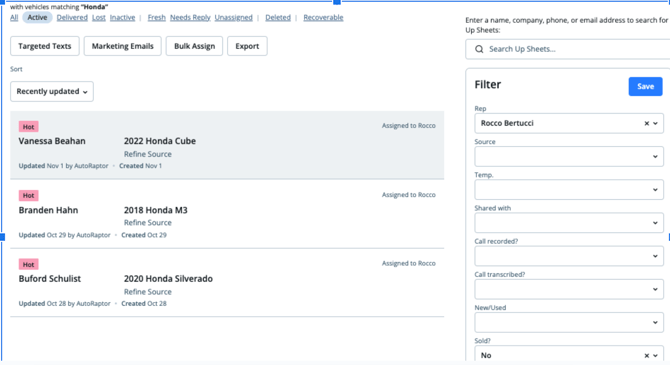
1. Apply Filters
- Navigate to the Up Sheet's tab to access your customer list.
- Go over to Filters.
- Select the desired filter criteria.
Example filters:
- Assigned salesperson → Rocco
- Status → Active
- Interest type → (e.g., Honda buyers)
- Sales outcome → No sale
2. Save the Filtered List
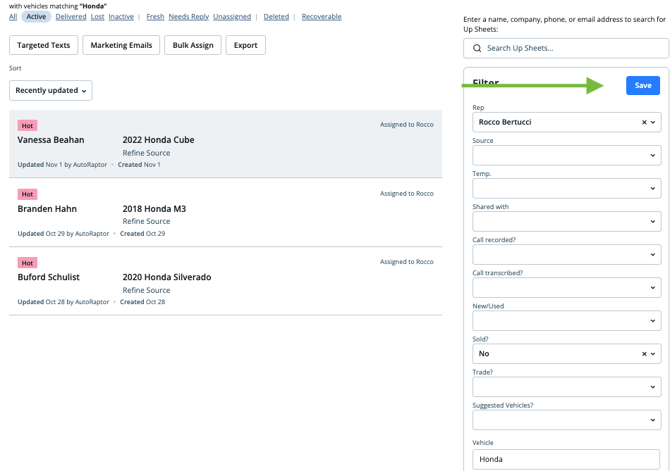
- Once results appear, click Save List.
- Name your list clearly.
Example:
Rocco – Active – Honda Interest - Choose access level:
- Private — only you can use the list
- Shared — team can access and reuse
- Click Save List.
Using Saved Lists
For Marketing Emails or Target Texts
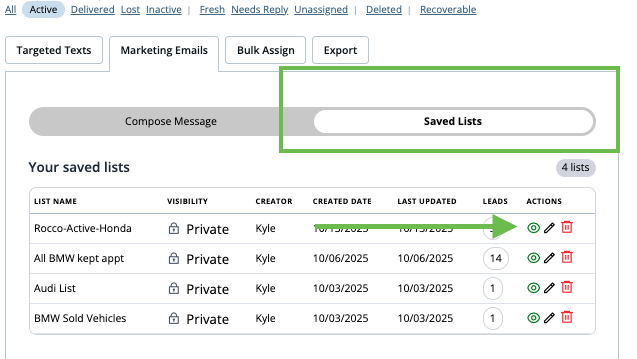
- Go to Marketing Emails or Target Texts
- Click on Saved List
- Click the eye icon next to the the list you'd like to load.
- Choose a template or write your own email.
- Send your campaign.
Pro Tips
💡 Name lists by salesperson + intent + status
Example: Rocco_Honda_Active_NoSale
💡 Share lists for consistent team outreach
💡 Saved lists can be reused across campaigns to save time
Coming Soon
✅ AI Sales Assistant audience activation
— Filter & save lists to power automated follow-up and nurturing
FAQs
|
Question |
Answer |
|
Can others see my saved list? |
Only if you choose to share it. |
|
Can I edit a saved list? |
Yes, load the list, adjust filters, save again. |
|
Does this update automatically? |
Yes, lists refresh as customer data updates. |
Troubleshooting
|
Issue |
Solution |
|
Can't find saved list |
Check Shared vs Private settings |
|
Filters aren’t applying correctly |
Clear filters and re-apply |
|
System won’t save |
Ensure list name is unique |
Version
- Feature: Save Lists for Targeted Messaging
- Release: v1.0
- Last Updated: November 3, 2025