
Overview
Sentiment Analysis evaluates customer messages in real time and categorizes them as Positive, Neutral, or Negative. This allows your team to quickly understand customer intent, urgency, and engagement level without needing to read every message in detail.
What’s New
Real-Time Sentiment Indicators
Each inbound customer message now includes a sentiment emoji displayed directly in the conversation thread:
- 😊 Positive
- 😐 Neutral
- 😟 Negative
These indicators update instantly as new messages come in—no refresh required—so you always have the most up-to-date insight at a glance.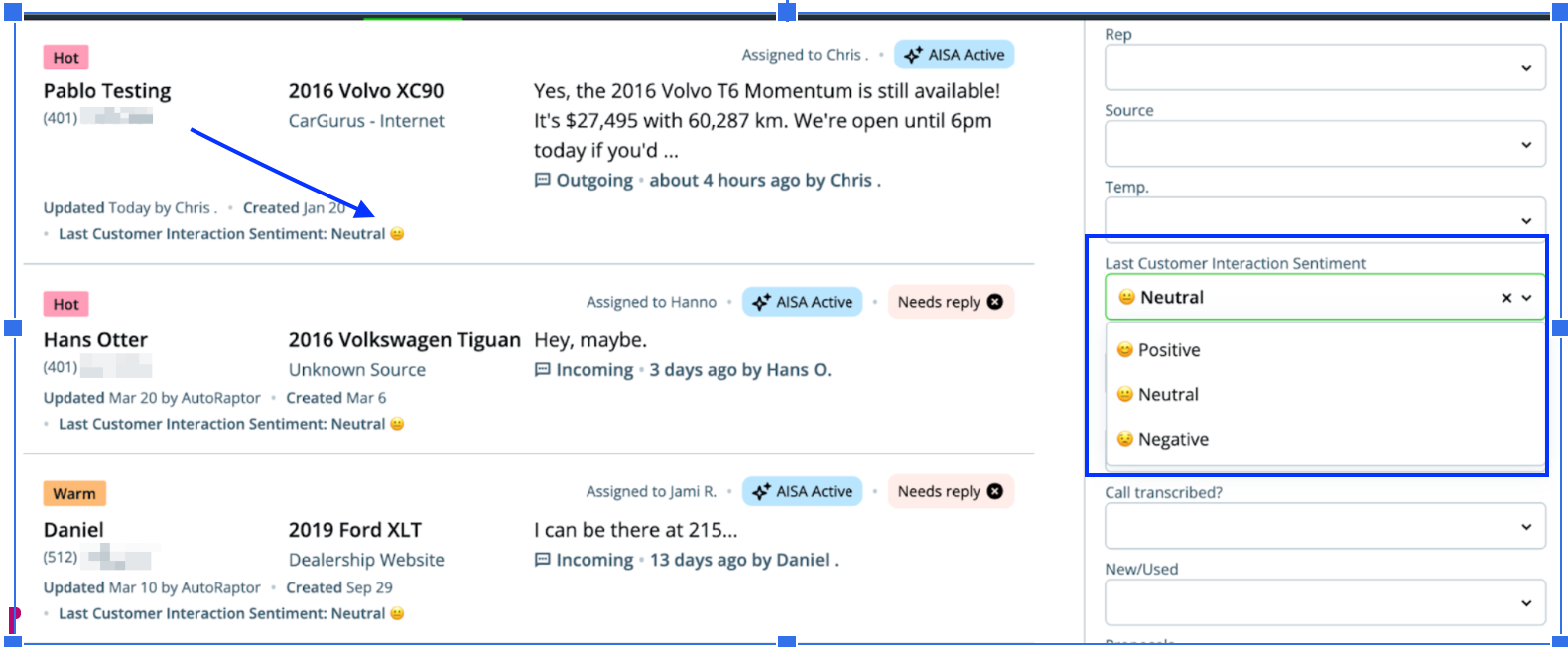
Filter Leads by Customer Sentiment
A new filter called “Last Customer Interaction Sentiment” has been added to the upsheet search panel.
This allows you to quickly segment and prioritize leads based on their most recent interaction:
- 😊 Positive
- 😐 Neutral
- 😟 Negative
With this filter, you can easily focus on the conversations that matter most.
Why It Matters
Sentiment Insights helps your team:
- Quickly identify unhappy customers who need immediate attention
- Prioritize high-intent buyers who are ready to move forward
- Improve your response strategy with better conversational context
- Increase efficiency by focusing on the most important leads first
Understanding Sentiment Categories
😊 Positive Sentiment
A Positive sentiment indicates the customer is engaged, responsive, or showing forward momentum in the buying process.
Common signals include:
- Confirming, requesting, or rescheduling an appointment
- Expressing purchase intent
- “I’m ready to move forward”
- Asking deal-related or financing questions
- “What’s the out-the-door price?”
- “Do you take trades?”
- “Can I put a deposit down?”
- Asking about specific vehicles (trim, color, availability, ETA)
- Requesting a test drive
- Responding warmly or enthusiastically
- Thanking the salesperson or expressing excitement
- Providing personal details (budget, trade-in, timeline, preferences)
- Referring friends or family
- Any engaged reply that moves the conversation forward
😐 Neutral Sentiment
A Neutral sentiment means the message does not clearly indicate buying intent or disengagement.
Common signals include:
- Short acknowledgments
- “ok”, “k”, “thx”, “got it”
- Emoji-only responses
- First-time inbound messages without context
- Automated replies or delivery failures
- Ambiguous messages that require more context
😟 Negative Sentiment
A Negative sentiment indicates the customer may be disengaged, frustrated, or exiting the buying journey.
Common signals include:
- Indicating they purchased elsewhere
- “I bought from another dealer”
- Expressing lack of interest
- “Not interested”
- “We’re holding off”
- Financial or situational disqualification
- “I can’t afford it right now”
- Complaints about pricing, service, or experience
- Disputes or disagreements
- Expressions of distrust
- “Your online price doesn’t match what you told me”
Best Practices
- Act quickly on negative sentiment to recover at-risk opportunities
- Prioritize positive conversations to close deals faster
- Use neutral responses as an opportunity to re-engage and guide the conversation
- Combine sentiment insights with your existing workflows to improve efficiency